On this page
This path takes a member with no CAD experience to a finished, review-ready parametric model. It has three parts: an official tutorial track in Fusion or SOLIDWORKS (your choice), a short set of practice drills, and one assessed final challenge - recreating the RB-1 utility airplane from screenshots alone.
Only the final challenge is assessed. Tutorials and drills are preparation: you submit nothing and receive no score for them.
CAD from zero
CAD means computer-aided design: software that builds an exact digital description of a part or assembly. Unlike a picture, a CAD model contains editable geometry and measurements. You can inspect it from any angle, change a driving value, produce a manufacturing drawing, or export it for another tool.
Words you will see constantly:
- 3D model: the digital solid or surface that represents the object.
- Sketch: a 2D profile drawn on a plane; the starting point for most 3D features.
- Feature: an operation that builds or changes the model, such as Extrude, Revolve, Loft, Cut, Fillet, Mirror or Pattern.
- Dimension: a numerical size or position, such as 40 mm wide.
- Constraint / relation: a rule such as horizontal, perpendicular, equal, tangent or symmetric. A fully constrained sketch cannot drift unexpectedly because every size and position is defined.
- Parameter: a named value that drives one or more dimensions, so the model updates without redrawing.
- Body / part: one solid item. Component / assembly: parts organized relative to each other.
- Feature tree / timeline: the ordered history of how the model was built. A clean order makes the model easy to revise.
- Native file: the software’s own format (.f3d for Fusion, .sldprt for SOLIDWORKS). STEP is the neutral exchange format every CAD tool reads. STL is a mesh for 3D printing.
- Drawing: the dimensioned 2D sheet made from the model.
Step 1: pick one software
Do the track for either Fusion or SOLIDWORKS, not both. The skills transfer; the buttons differ.
- Fusion - free for SFU students through the Education licence (do not use the Personal use licence, which limits the STEP export and drawing this challenge needs). Runs on Windows and Mac, cloud-based files. Most new members start here.
- SOLIDWORKS - industry standard, Windows only. Use the club’s entitlement; some MySolidWorks lessons need the team’s or your entitled account.
Step 2: complete one official tutorial track, in order
Fusion track
- Tour the Fusion user interface - navigation, Browser, timeline, workspaces, view controls and file handling.
- Learn Fusion for CAD in 90 minutes - the full beginner project: project files, constrained sketches, solid parts, fillets, holes, patterns, components and a basic drawing.
- Sketch with Fusion - sketch geometry, dimensions and geometric constraints, and parameters. For this path, every finished sketch should show as fully constrained.
- Part modeling with Fusion - Extrude, Revolve, Loft, Fillet, Linear and Circular Pattern, Mirror and Combine. The RB-1 airplane uses most of these.
SOLIDWORKS track
- Getting Started with SOLIDWORKS CAD - the official entry learning path.
- SOLIDWORKS Basics and the User Interface - navigation, FeatureManager and the command manager.
- SOLIDWORKS CAD Fundamentals - the core modelling workflow end to end.
- Fully Defining a Sketch - dimensions and relations until every sketch is fully defined.
- Part Modeling - Extrude, Revolve, Fillet, Mirror and Pattern.
The official sites may ask for a free Autodesk or MySolidWorks account.
Step 3: practice drills (unassessed)
Do these in your chosen software after the tutorial track. Nothing to submit; they build the exact moves the RB-1 challenge checks.
- Bracket: a flat L-bracket with two mounting holes and a fillet on the inside corner. Fully constrained sketch, then Extrude, Hole and Fillet.
- Knob: a symmetric knob made with Revolve from a half-profile sketch. Add a flat with a Cut.
- Plate with pattern: a rectangular plate with a 4 by 2 hole pattern made with one hole plus Linear Pattern, and rounded outer corners.
- Mirrored part: model one half of a symmetric part, then Mirror it about the centre plane. Check the result is truly symmetric.
Step 4: the RB-1 challenge (assessed)
Recreate the RB-1, a small fictional high-wing utility airplane with a nose propeller, in Fusion or SOLIDWORKS. You get six reference screenshots and nothing else: no dimensions, no drawings, no starting file. Study the visible geometry and proportions, then build a clean parametric model that matches.
The reference set
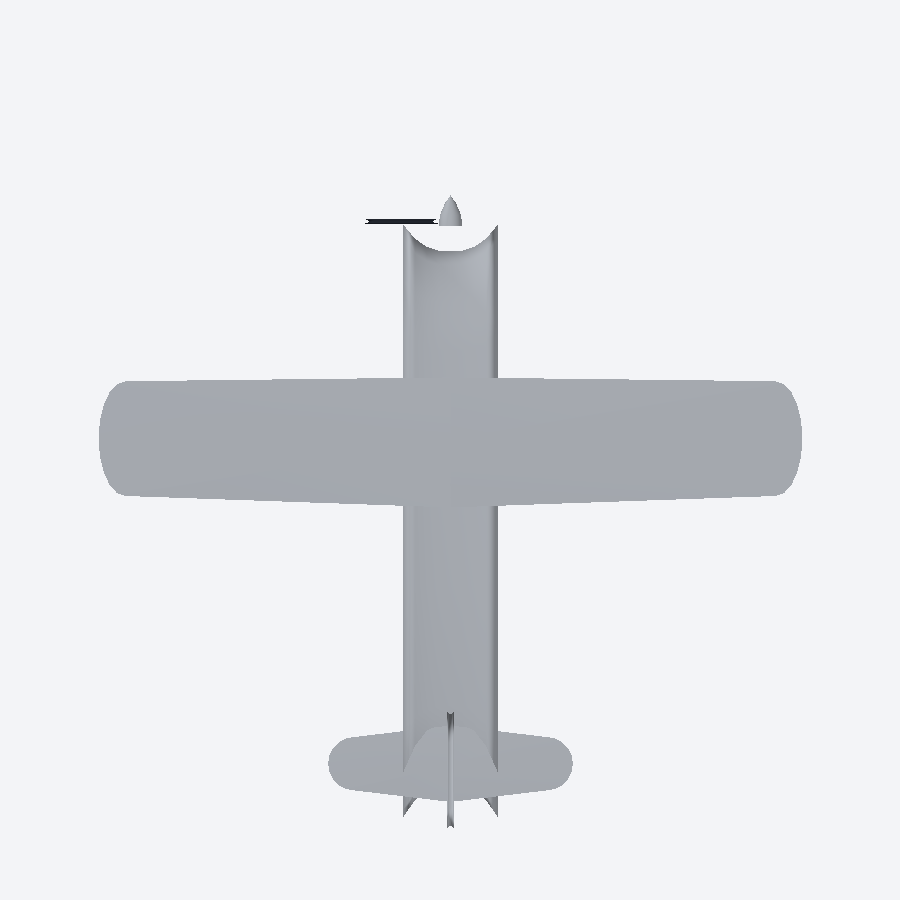
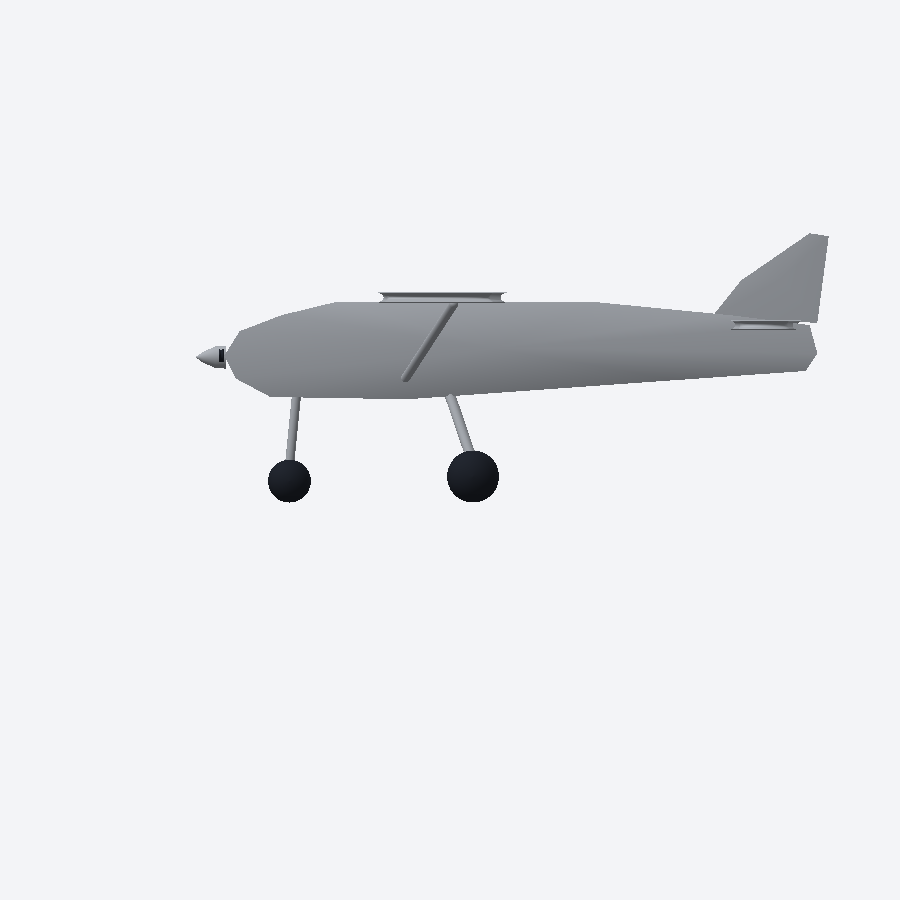
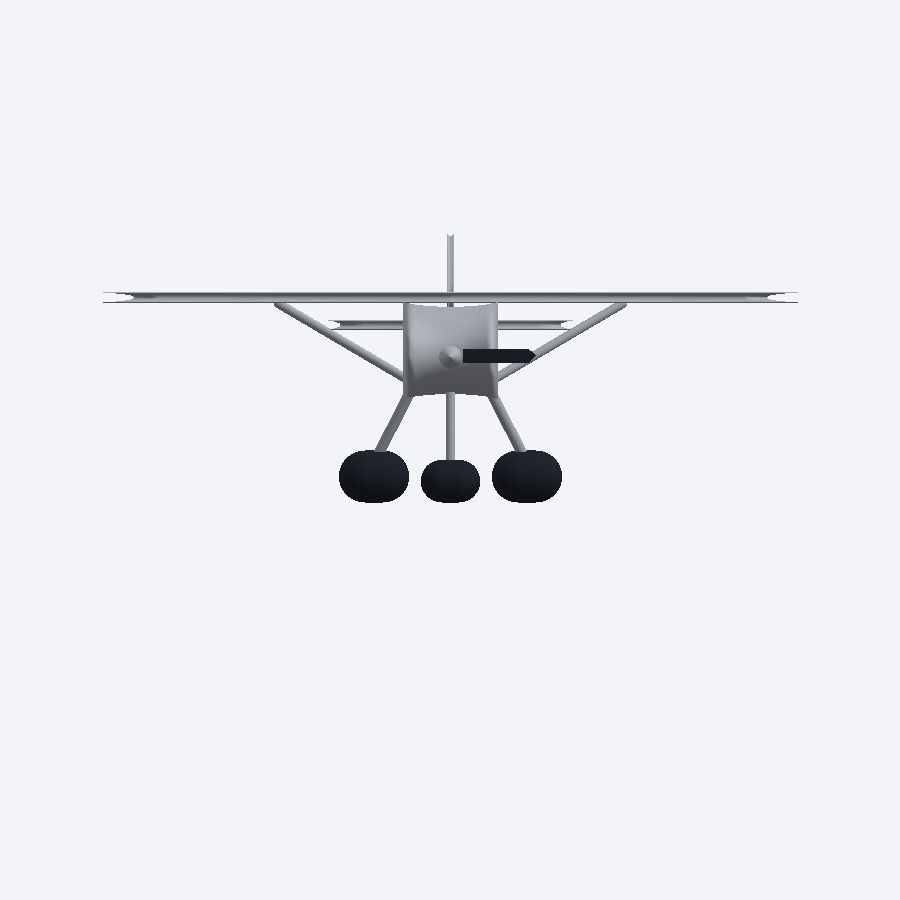
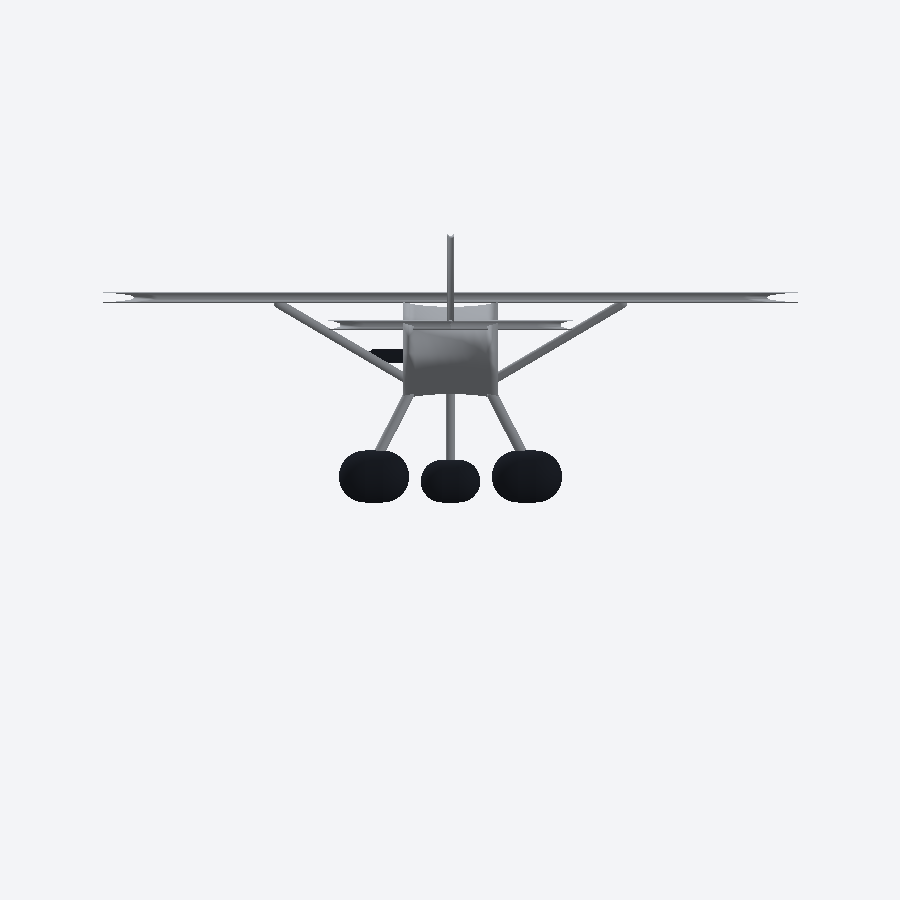
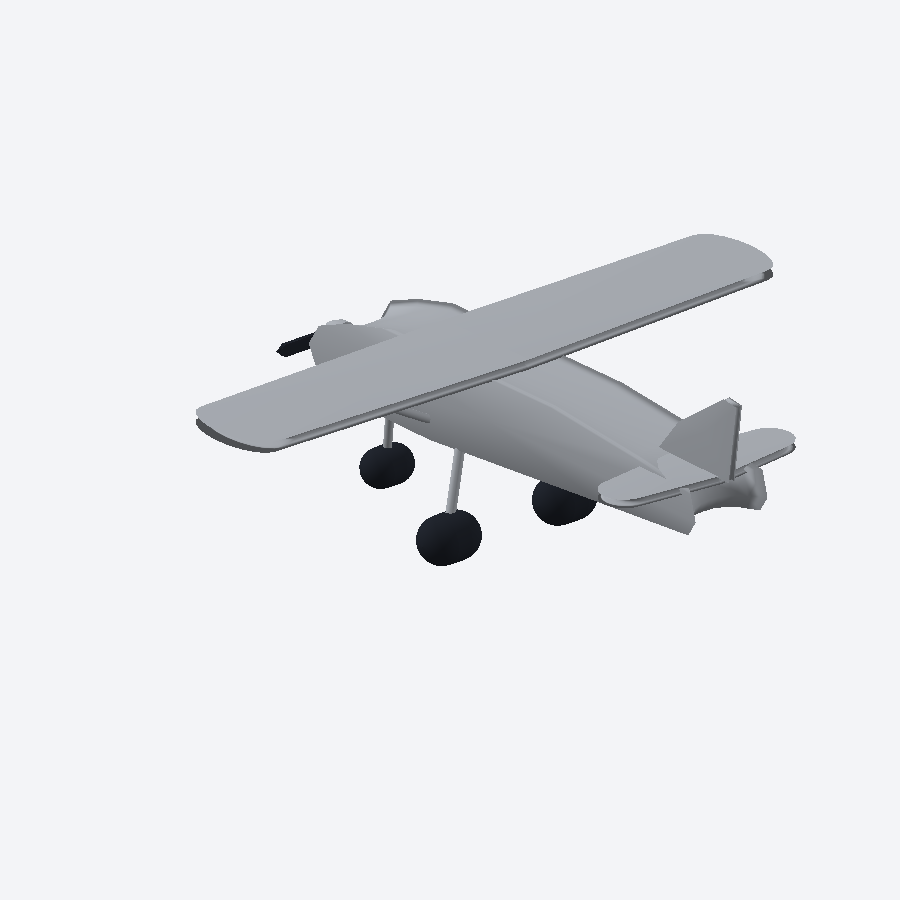
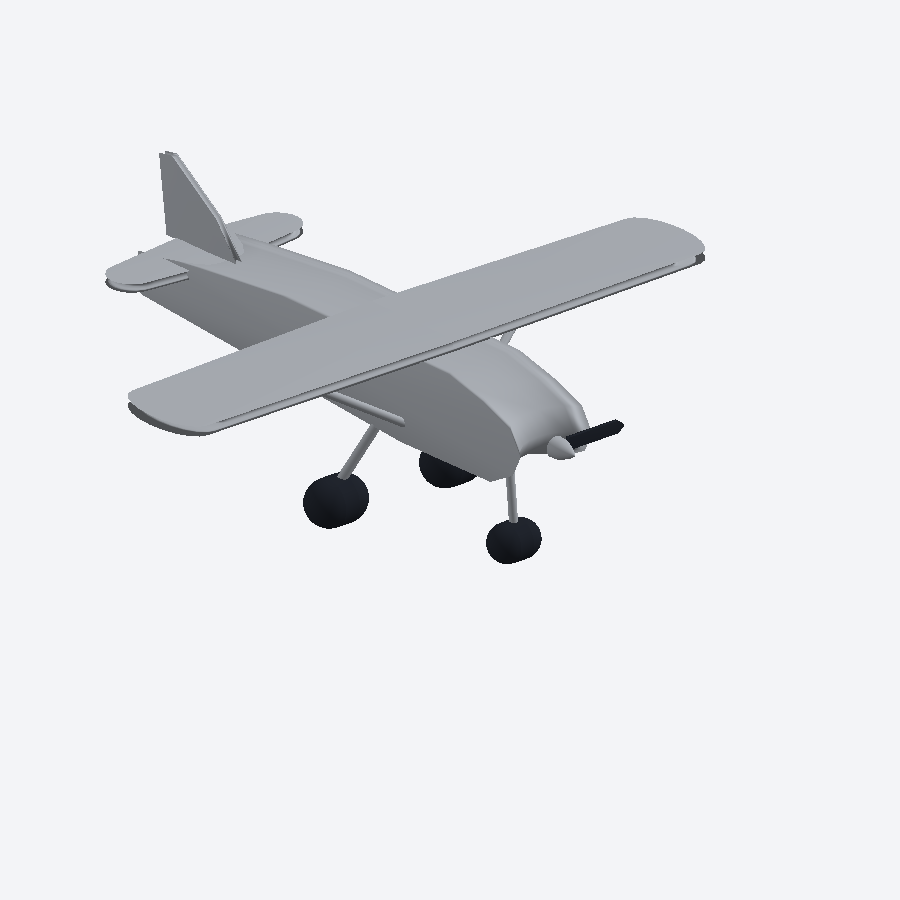
What the model must contain
- One boxy cabin fuselage with a sloped engine cowling and an upswept tail underside.
- One straight high wing with rounded tips, mounted on the cabin roof.
- Two wing struts, one per side, running from the lower fuselage to the wing underside.
- A nose propeller: a spinner plus two blades.
- Fixed tricycle landing gear: one nose gear and two main gears, each a leg with a wheel.
- A conventional tail: one horizontal stabilizer and one vertical fin.
- No windows, interior, control-surface gaps or hidden details. Match what you see; do not add your own details.
What to submit
Send the Tech Team Lead, in one message or folder:
- The native file (.f3d or .sldprt).
- A STEP export of the model.
- A drawing of the model (PDF) with overall dimensions.
- Six views (renders or screenshots) from the same six angles as the reference set.
How it is graded
The result is Pass or Revise and resubmit. There is no score and no retry limit; resubmit until it passes. A pass requires all of the following:
- Geometry and proportions visibly match the reference set in all six views.
- Every required feature from the list above is present, and nothing extra.
- The model is symmetric about its centreline.
- Sketches are fully constrained and the model is parametric - driving dimensions, no free-floating geometry.
- The file reopens and rebuilds with no errors.
- Native file, STEP, drawing and six views are all included.
Questions during the challenge: ask in Discord.